Social Inbox
Your content rocks. Now control the echo.
All comments, DMs, and mentions from all channels in one place. Sort, assign, reply. Without tabs.
Social Inbox is used by:



The challenges in everyday life
Every platform has its inbox. But nobody has
the overview.
" height="16.000197273959174px" id="uEgF89SCu" transform="translate(4 4)" width="16px"/></svg>)
LinkedIn
😠 4 new
" width="13.85412328640112px"><path d="M 5.421 0.662 L 5.421 0.046 C 5.208 0.016 4.993 0 4.778 0 C 2.14 0.003 0.003 2.14 0 4.778 C 0 6.395 0.808 7.825 2.039 8.691 C 1.213 7.809 0.754 6.646 0.755 5.438 C 0.758 2.845 2.827 0.727 5.419 0.664 Z" fill="rgb(37, 244, 238)" height="8.690833032889742px" id="IhTQRh04M" transform="translate(0 5.416)" width="5.421307178023568px"/><path d="M 1.768 13.162 C 2.943 13.162 3.902 12.226 3.944 11.061 L 3.948 0.658 L 5.849 0.658 C 5.808 0.441 5.788 0.221 5.789 0 L 3.194 0 L 3.19 10.403 C 3.145 11.574 2.185 12.501 1.013 12.504 C 0.66 12.504 0.313 12.418 0 12.254 C 0.409 12.825 1.068 13.163 1.77 13.164 Z M 9.4 4.188 L 9.4 3.609 C 8.673 3.609 7.999 3.393 7.432 3.023 C 7.944 3.614 8.635 4.022 9.399 4.186 L 9.399 4.188 Z" fill="rgb(37, 244, 238)" height="13.16378075361327px" id="qG7XtVmY9" transform="translate(3.939 0)" width="9.399886238402217px"/><path d="M 8.602 2.367 C 8.029 1.712 7.713 0.871 7.713 0 L 7.017 0 C 7.199 0.972 7.771 1.828 8.6 2.367 Z M 2.181 7.482 C 0.977 7.483 0.001 8.459 0 9.663 C 0 10.501 0.476 11.229 1.169 11.593 C 0.9 11.223 0.756 10.778 0.755 10.321 C 0.755 9.117 1.734 8.139 2.937 8.139 C 3.162 8.139 3.376 8.176 3.58 8.241 L 3.58 5.592 C 3.367 5.561 3.152 5.545 2.937 5.544 C 2.898 5.544 2.863 5.544 2.824 5.546 L 2.824 7.581 C 2.616 7.515 2.4 7.481 2.181 7.48 Z" fill="rgb(254, 44, 85)" height="11.593030199208705px" id="aqWRSB9iy" transform="translate(2.462 0.492)" width="8.602201413503707px"/><path d="M 11.128 0 L 11.128 2.019 C 9.832 2.02 8.568 1.613 7.516 0.857 L 7.516 6.132 C 7.513 8.77 5.376 10.908 2.738 10.911 C 1.758 10.912 0.801 10.61 0 10.045 C 0.902 11.018 2.169 11.57 3.496 11.568 C 6.133 11.565 8.271 9.428 8.273 6.79 L 8.273 1.516 C 9.326 2.271 10.589 2.677 11.885 2.676 L 11.885 0.081 C 11.627 0.081 11.371 0.053 11.127 0 Z" fill="rgb(254, 44, 85)" height="11.568413898854569px" id="KznHl4JP8" transform="translate(1.97 4.432)" width="11.884529523049679px"/><path d="M 8.799 9.663 L 8.799 4.388 C 9.852 5.144 11.115 5.55 12.41 5.548 L 12.41 3.53 C 11.646 3.366 10.956 2.958 10.444 2.368 C 9.615 1.828 9.043 0.973 8.861 0 L 6.961 0 L 6.956 10.403 C 6.911 11.574 5.951 12.501 4.779 12.504 C 4.077 12.503 3.418 12.165 3.009 11.594 C 2.29 11.217 1.84 10.474 1.84 9.663 C 1.84 8.459 2.818 7.482 4.021 7.482 C 4.245 7.482 4.46 7.518 4.664 7.583 L 4.664 5.548 C 2.072 5.612 0.003 7.73 0 10.323 C -0.001 11.531 0.459 12.694 1.284 13.575 C 2.06 14.121 3.005 14.442 4.021 14.442 C 6.659 14.439 8.797 12.301 8.799 9.663 Z" fill="rgb(0, 0, 0)" height="14.442047187232633px" id="i_20EqF6m" transform="translate(0.985 0.492)" width="12.410411523005479px"/></g></svg>)
TikTok
16
Twitter
2
" width="21px"><path d="M 20.559 2.19 C 20.32 1.332 19.604 0.655 18.697 0.418 C 17.063 0 10.5 0 10.5 0 C 10.5 0 3.938 0 2.291 0.418 C 1.398 0.633 0.688 1.309 0.429 2.19 C 0 3.748 0 7 0 7 C 0 7 0 10.251 0.441 11.81 C 0.68 12.668 1.396 13.346 2.303 13.582 C 3.938 14 10.5 14 10.5 14 C 10.5 14 17.063 14 18.709 13.582 C 19.602 13.367 20.312 12.691 20.571 11.81 C 21 10.251 21 7 21 7 C 21 7 21 3.748 20.559 2.19 Z" fill="rgb(255, 0, 51)" height="14px" id="Kh7w_HM8O" width="21px"/><path d="M 0 5.916 L 5.489 2.958 L 0.001 0 L 0.001 5.916 Z" fill="rgb(255, 255, 255)" height="5.916399999999998px" id="K00IqQzGM" transform="translate(8.4 4.2)" width="5.488699999999994px"/></g></svg>)
YouTube
2
Bluesky
16
" width="15.962615342807133px"><path d="M 15.963 7.979 C 15.962 3.823 12.771 0.364 8.629 0.027 C 4.486 -0.31 0.779 2.588 0.106 6.69 C -0.566 10.791 2.021 14.722 6.054 15.726 L 6.054 10.419 L 4.408 10.419 L 4.408 7.979 L 6.054 7.979 L 6.054 6.929 C 6.054 4.212 7.283 2.953 9.95 2.953 C 10.456 2.953 11.329 3.053 11.686 3.151 L 11.686 5.362 C 11.496 5.342 11.169 5.332 10.763 5.332 C 9.454 5.332 8.949 5.829 8.949 7.117 L 8.949 7.979 L 11.556 7.979 L 11.107 10.419 L 8.949 10.419 L 8.949 15.901 C 12.953 15.412 15.963 12.013 15.963 7.979 Z" fill="rgb(8, 102, 255)" height="15.901356358823744px" id="AB3unsttd" width="15.962615342807133px"/><path d="M 6.7 7.465 L 7.148 5.026 L 4.541 5.026 L 4.541 4.163 C 4.541 2.875 5.046 2.379 6.355 2.379 C 6.761 2.379 7.089 2.389 7.277 2.409 L 7.277 0.198 C 6.92 0.099 6.047 0 5.542 0 C 2.875 0 1.646 1.259 1.646 3.975 L 1.646 5.026 L 0 5.026 L 0 7.465 L 1.646 7.465 L 1.646 12.772 C 2.592 13.007 3.573 13.066 4.541 12.948 L 4.541 7.465 Z" fill="rgb(255, 255, 255)" height="13.007187945652229px" id="uB1h1UjSj" transform="translate(4.489 2.993)" width="7.276523708137574px"/></g></svg>)
Facebook
" height="15.9998039074769px" id="YeZxmYc2m" transform="translate(4 4)" width="15.999803907476904px"/></svg>)
Instagram
" width="16px"><path d="M 7.68 1.636 C 7.68 1.069 7.629 0.524 7.535 0 L 0 0 L 0 3.098 L 4.305 3.098 C 4.116 4.095 3.549 4.938 2.698 5.505 L 2.698 7.52 L 5.295 7.52 C 6.807 6.124 7.68 4.073 7.68 1.636 Z" fill="rgb(66, 133, 244)" height="7.519999999999999px" id="SuVLQtwwJ" transform="translate(8 6.545)" width="7.67999999999995px"/><path d="M 7.142 6.473 C 9.302 6.473 11.113 5.76 12.436 4.538 L 9.84 2.524 C 9.127 3.004 8.218 3.295 7.142 3.295 C 5.062 3.295 3.295 1.891 2.662 0 L 0 0 L 0 2.065 C 1.316 4.676 4.015 6.473 7.142 6.473 Z" fill="rgb(52, 168, 83)" height="6.472727272727274px" id="hm3wHoye3" transform="translate(0.727 9.455)" width="12.436363636363637px"/><path d="M 3.52 5.105 C 3.36 4.625 3.265 4.116 3.265 3.585 C 3.265 3.055 3.36 2.545 3.52 2.065 L 3.52 0 L 0.858 0 C 0.313 1.076 0 2.291 0 3.585 C 0 4.88 0.313 6.095 0.858 7.171 L 2.931 5.556 Z" fill="rgb(251, 188, 5)" height="7.17090909090909px" id="NEVr3Q5xc" transform="translate(0 4.364)" width="3.5200000000000387px"/><path d="M 7.142 3.185 C 8.32 3.185 9.367 3.593 10.204 4.378 L 12.495 2.087 C 11.105 0.793 9.302 0 7.142 0 C 4.015 0 1.316 1.796 0 4.415 L 2.662 6.48 C 3.295 4.589 5.062 3.185 7.142 3.185 Z" fill="rgb(234, 67, 53)" height="6.48px" id="eyIcUzsQx" transform="translate(0.727 0)" width="12.494545454545403px"/><path d="M 0 0 L 16 0 L 16 16 L 0 16 Z" fill="transparent" height="16px" id="o_ZuJEHcC" width="16px"/></g></svg>)
Google
2 reviews!
Insights
Everything the internet says about you.
In one place.
The Social Inbox bundles comments, reactions and feedback from all channels, right in your uhub workspace. Reply to messages, assign them internally, stay in the picture.
For everyone who wants a better overview and less copy-pasting.
Comments, DMs and mentions. Centrally collected and clearly sorted.
The Social Inbox consolidates comments, reactions, and feedback from all channels – directly in your uhub workspace. Respond to messages, assign them internally, stay in the loop. For everyone who wants more oversight – and less copy-paste.
Dec 2025
Iteration 1/3 - 2025
more coming soon in 2026

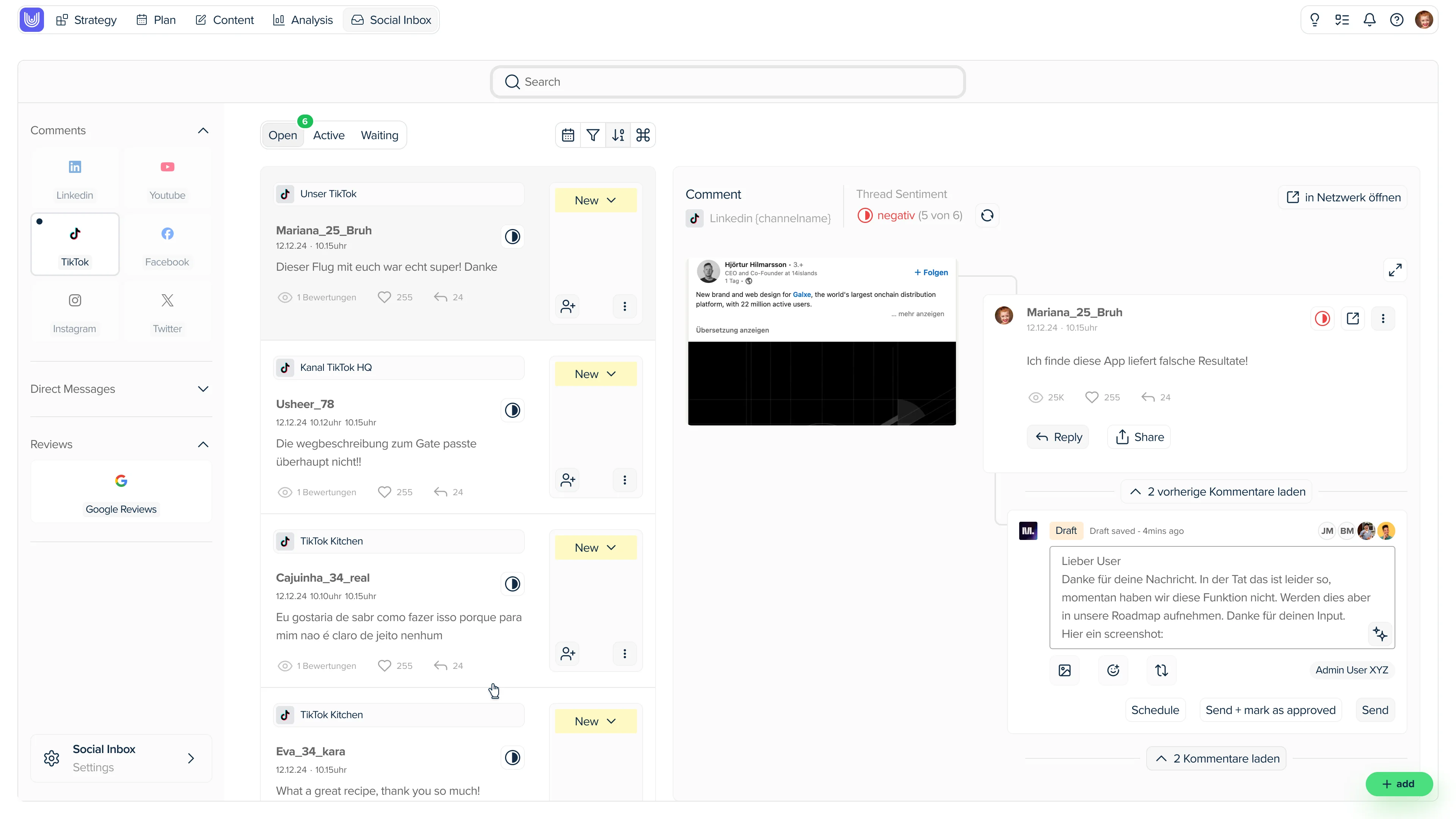
The Social Inbox consolidates comments, reactions, and feedback from all channels – directly in your uhub workspace. Respond to messages, assign them internally, stay in the loop. For everyone who wants more oversight – and less copy-paste.
You can instantly see what is happening where, filtered by channel, post or topic. No more searching across five different apps.
Assignments to team members
One click and every comment has an owner.
No more misunderstandings.



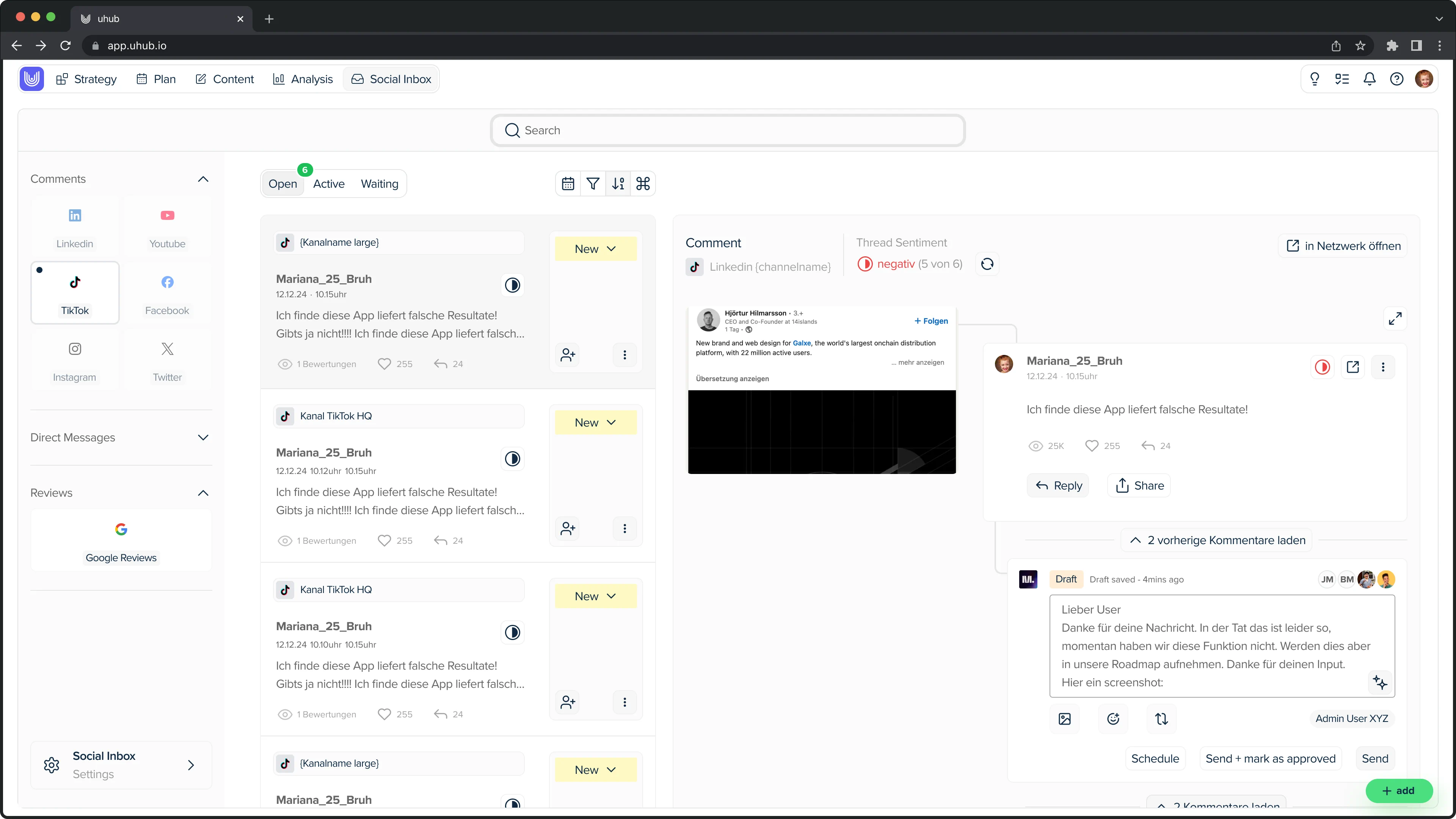
Moderation / Direct responses
React directly from uhub, without copy-pasting and without switching platforms. This saves time and avoids mistakes.
Use Cases
Who benefits from centralised community management
Four situations in which teams lose track today.
Communications management
You can see which message triggers which reaction, and guide the strategy with real data.
Social Media & Community Teams
All comments, mentions and messages in one view. Filter, reply, complete.
Institutions with reputational risk
You recognise early on when negative feedback is increasing, and can react before it escalates.
Agencies & distributed teams
Clear responsibilities per channel and mandate. Every response remains traceable.
Comparison
uhub Social Inbox compared to native apps and publishing tools
The difference is not in the inbox, but in the context: community management right where your communication strategy and your analytics are.
Native apps of the platforms
Each channel is opened individually and searched individually
Feedback is noted down by hand and copied
No responsibilities, no shared vision in the team
No connection between published message and reaction
uhub Social Inbox
Community management, planning and evaluation in one workspace
Direct connection between “What did we publish?” and “How is the community reacting?”
Assignments per channel and person, transparent for the whole team
Recognising early warning signs when negative feedback increases
Pure publishing & scheduling tools
Focus on distribution, community feedback remains a sideshow
Inbox often only included in expensive Enterprise packages
Communication strategy is located in another tool
Evaluation and feedback must be merged manually
Frequently Asked Questions
Social Inbox and Community Management: Frequently Asked Questions
What is a social inbox?
What distinguishes the uhub Social Inbox from other community management tools?
Which channels can I manage in the Social Inbox?
Can I assign comments to team members?
Does the Social Inbox help to detect a shitstorm early on?
How quickly can I find specific feedback?
Who is the uhub Social Inbox suitable for?
Insights
Stay in touch with your communication
We are continuously developing the Social Inbox, for communication teams that grow with us.
Today
Iteration 1.0
Nov 2025
Implementation of the first version of the uhub - Social Inbox with the main channels like Instagram, LinkedIn, TikTok, Twitter, YouTube, and Google reviews. Display and respond to comments and reviews.
Iteration 2.0
Jun 2026
Iteration 2 expands the Social Inbox with a complete comment history, stronger response features, bulk actions, clearer mentions, and the integration of external users. Additionally, new sorting functions provide significantly more clarity and speed.
― coming soon ―
Iteration 3.0
2026
Iteration 3 brings profiles for the people behind the reactions, moderation features such as warning and "blocking", AI-assisted replies and translations, as well as automatic prioritisation based on sentiment and reach. In addition, there are tags, reply templates and reports that can be exported.
HC
HC
HC
HC
Customer feedback
One inbox instead of five tools
Why the Swiss Army centrally moderates its community on Tiktok,
Instagram, LinkedIn and Youtube through uhub.
Thanks to the Social Inbox, we always keep track, communicate with our community, and organize ourselves as a team. Everything on the same platform. This allows us to work efficiently and strengthen the dialogue.
Date: January 2026
Swiss Army
Frederik Besse
Community Management Swiss Army